
Connecting the Orange Pi 5 Camera Adapter
Buy the Orange Pi 5 Camera Adapter ($15)
This page covers the hardware: connecting a Raspberry Pi camera to an Orange Pi 5 board with the Tachyn Labs adapter. For the image, camera settings and testing, see the setup guide.
Why Pi cameras do not work natively
- Raspberry Pi boards use a 15-pin or 22-pin FPC connector.
- The Orange Pi 5 series uses a 30-pin board-to-board mezzanine connector.
- Signal assignments (lane order, I2C, clock, power rails) differ.
- I2C on the Orange Pi is 1.8V; the Raspberry Pi uses 3.3V, so the adapter level-shifts it.
What’s in the box
- Camera Adapter Board + Orange Pi 5 FPC Cable.
What you need
- Orange Pi 5, 5B, 5 Plus, 5 Max or 5 Pro.
- A Raspberry Pi ecosystem camera module. See the supported cameras.
- A camera FPC: 22-pin to 22-pin, or 22-pin to 15-pin for 15-pin cameras (official Pi Camera v1, v2 and Camera Module 3). You supply it.
Cable orientation
- Adapter CAM connector: the Pi camera cable goes in with its exposed contacts facing up, toward the top of the board.
- Orange Pi 5 FPC Cable: both ends have board-to-board (B2B) connectors that only fit one way. Line up the white dots so pin 1 is aligned.
- Pin 1 is top-right of the adapter, pin 22 top-left. The camera side matches the Raspberry Pi camera connector; see the camera connector pinout.
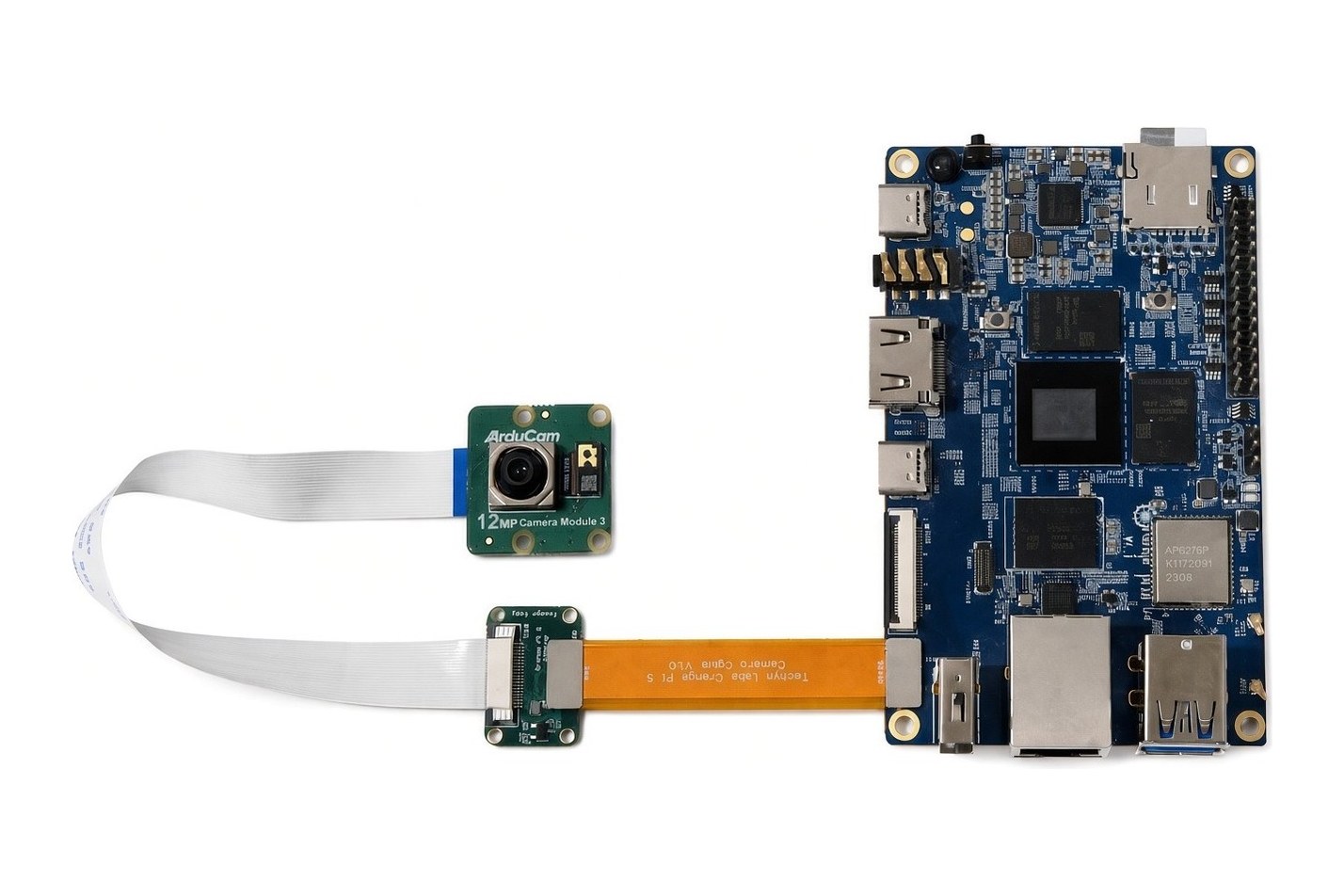
Connect the hardware
- Power off the Orange Pi before connecting anything.
- Connect the included Orange Pi 5 FPC Cable from the Orange Pi camera connector to the Tachyn Labs adapter board, lining up the white dots so pin 1 is aligned.
- Attach the Pi camera to the adapter with a 22-to-22 or 22-to-15 pin camera cable, depending on your camera, exposed contacts facing up.
- Check orientation and seating — both ends fully inserted and latched.
- Note the CAM number printed next to the board connector you used. You need it for the port name.
- Power on the Orange Pi.
Which port name to use
The port name in the camera settings is the CAM number on the board:
- Orange Pi 5 / 5B: CAM1 =
port1, CAM2 =port2, CAM3 =port3 - Orange Pi 5 Max: CAM0 =
port0, CAM1 =port1, CAM2 =port2 - Orange Pi 5 Plus: CAM1 =
port1 - Orange Pi 5 Pro: CAM1 =
port1, CAM2 =port2
For example, a Camera Module 3 on CAM1 is imx708,port1.
Next: software
Flash our Tachyn Labs Ubuntu image and turn on the camera with the setup guide. Camera not showing up? See Troubleshooting.
Use at your own risk
This is a hobbyist and experimental setup. Always verify connections before powering on — a misaligned FPC cable can short power rails or data lanes.